MCP communityWardn HubCommunity directory for MCP servers.

Discover

  • Explore
  • Categories
  • Users
  • Partners

Contribute

  • Submit
  • Submissions
  • Advertise
  • API tokens
  • Sign in
© 2026 Wardn AI
Wardn Hub
ExploreCategoriesUsersAdvertise

MCP Apple Notes

io.github.rafalwilinski/mcp-apple-notes

Overview

Talk with your notes in Claude. RAG over your Apple Notes using Model Context Protocol.

WebsiteRepository

Documentation

MCP Apple Notes

MCP Apple Notes

A Model Context Protocol (MCP) server that enables semantic search and RAG (Retrieval Augmented Generation) over your Apple Notes. This allows AI assistants like Claude to search and reference your Apple Notes during conversations.
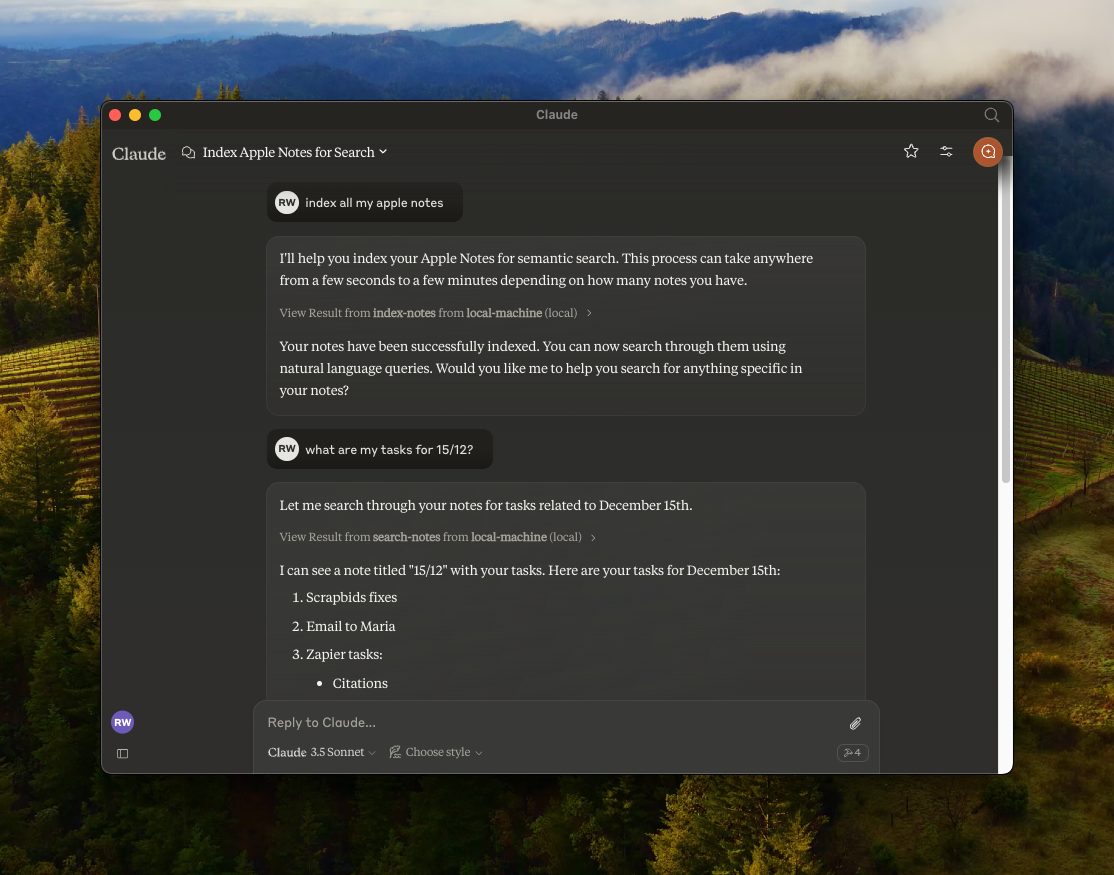
MCP Apple Notes

Features

  • 🔍 Semantic search over Apple Notes using all-MiniLM-L6-v2 on-device embeddings model
  • 📝 Full-text search capabilities
  • 📊 Vector storage using LanceDB
  • 🤖 MCP-compatible server for AI assistant integration
  • 🍎 Native Apple Notes integration via JXA
  • 🏃‍♂️ Fully local execution - no API keys needed

Prerequisites

  • Bun
  • Claude Desktop

Installation

  1. Clone the repository:
git clone https://github.com/RafalWilinski/mcp-apple-notes
cd mcp-apple-notes
  1. Install dependencies:
bun install

Usage

  1. Open Claude desktop app and go to Settings -> Developer -> Edit Config
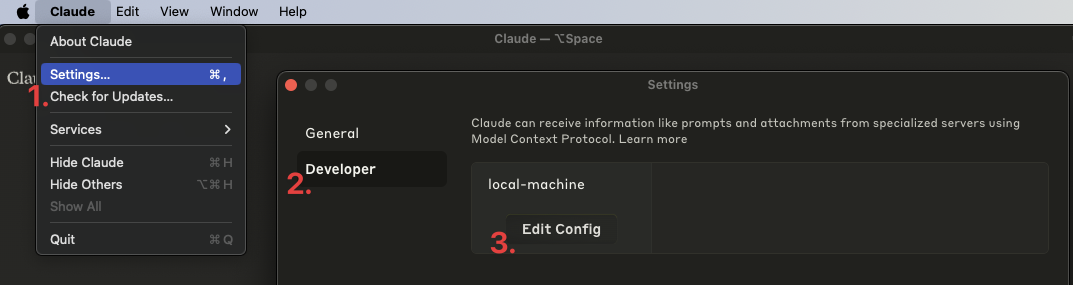
Claude Desktop Settings

  1. Open the claude_desktop_config.json and add the following entry:
{
  "mcpServers": {
    "local-machine": {
      "command": "/Users/<YOUR_USER_NAME>/.bun/bin/bun",
      "args": ["/Users/<YOUR_USER_NAME>/apple-notes-mcp/index.ts"]
    }
  }
}

Important: Replace <YOUR_USER_NAME> with your actual username.

  1. Restart Claude desktop app. You should see this:
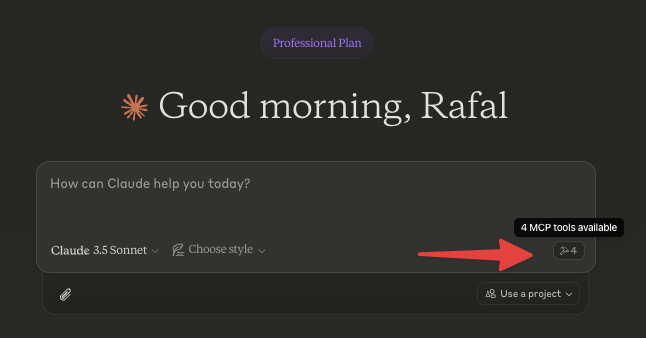
Claude MCP Connection Status

  1. Start by indexing your notes. Ask Claude to index your notes by saying something like: "Index my notes" or "Index my Apple Notes".

Troubleshooting

To see logs:

tail -n 50 -f ~/Library/Logs/Claude/mcp-server-local-machine.log
# or
tail -n 50 -f ~/Library/Logs/Claude/mcp.log

Todos

  • Apple notes are returned in the HTML format. We should turn them to Markdown and embed that
  • Chunk source content using recursive text splitter or markdown text splitter
  • Add an option to use custom embeddings model
  • More control over DB - purge, custom queries, etc.
  • Storing notes in Notes via Claude

Wardn Hub Source Review Notes

  • Importer returned a local absolute Bun path and a local absolute index.ts path. Those README placeholders are not portable launch values, so the package transport is normalized to command bun, args [index.ts], env {}.
  • The reviewed upstream README and source document a stdio Bun launch of index.ts; no optional runtime MCP CLI flags were found.
  • Install/build/test commands such as bun install, bun run start, bun build index.ts --outdir dist --target node, and npx tsx index.test.ts are source-review install/developer commands only, not runtime command arguments.
  • This repository is not the same package as npm apple-notes-mcp or npm mcp-apple-notes; those registry packages point to different GitHub repositories.
  • Package identifier and version are split as a GitHub/source package: identifier RafalWilinski/mcp-apple-notes, package version 1.0.0.
  • Default transport is stdio via StdioServerTransport.
  • The server runs locally with Bun, accesses Apple Notes through JXA, stores LanceDB vector/full-text data under the user home directory, and uses the on-device Xenova/all-MiniLM-L6-v2 embedding model.
  • No runtime environment variables or remote endpoint are documented or used by the inspected source.

Latest Version

Version
1.0.0
Category
File Systems
Published
Jun 28, 2026
Updated
Jun 28, 2026
Published By
Abhimanyu Saharan